
Whitepaper · Network Security
Network Security Checklist
Three attack paths we use to get from "one compromised laptop" to "domain admin" during internal penetration tests, plus the two-tier checklist that closes them.
- Category:
- Network Security
- Read time:
- 9 minutes
- Based on:
- CipherTrivia internal network penetration tests
"We have a firewall and a VPN, so the internal network is fine" is the sentence that, more than any other, tells me an internal penetration test is going to go quickly. The internet-facing perimeter has gotten a lot of attention over the years. What's behind it usually hasn't.
On most internal engagements, our starting point is a single low-privilege foothold: a regular employee laptop, or a guest Wi-Fi connection. What happens next is rarely about exotic exploits. It's almost always one of three things below.
Three Ways We Get In
Scenario 01
The Flat Network
From a guest or office VLAN, we run a basic network scan and discover we can reach finance servers, internal admin panels and database ports directly, because nothing actually separates "user network" from "server network." No exploit required; the network topology does the work for us.
Scenario 02
Credential Reuse & Lateral Movement
A local administrator password is shared across most workstations, often set once during imaging and never rotated. Cracking or extracting it from one machine gives us admin on dozens. From there, cached domain credentials on one of those machines often belong to someone with much higher privileges.
Scenario 03
Exposed Management Interfaces
Switch, router, hypervisor and out-of-band management interfaces (iLO, iDRAC, IPMI) are reachable from general-purpose VLANs, often still on default or weak credentials. Access to a hypervisor management interface can mean access to every virtual machine running on it, including domain controllers.
None of these require zero-days. They're all design and hygiene issues, which is also why they're consistently fixable.
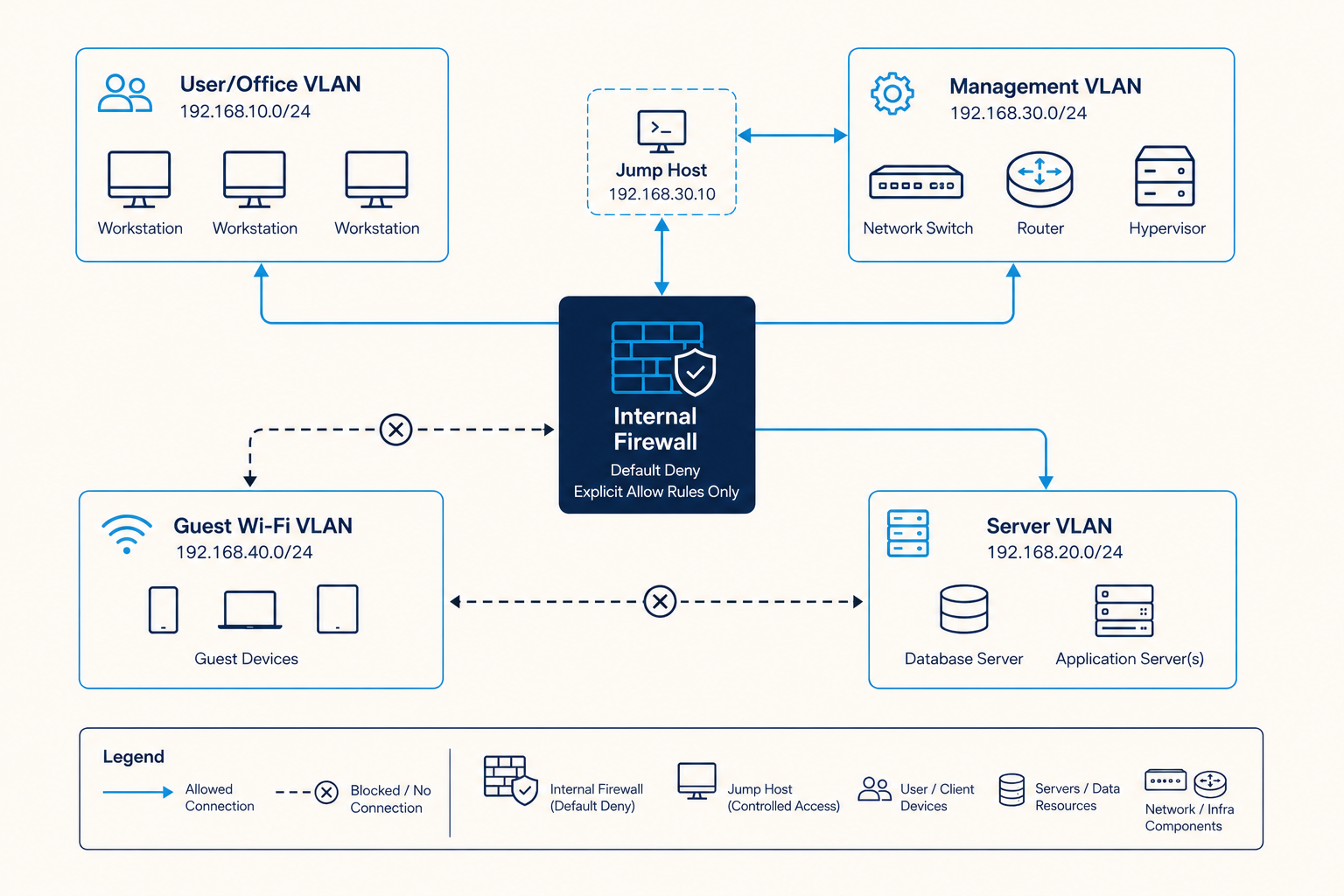
A Segmentation Reference Diagram
The diagram below is the segmentation model we recommend as a baseline: user, server, management and guest networks are separated into distinct zones, with a firewall enforcing rules between them, not just at the internet edge.
The Checklist
We split this into two tiers: the first closes the scenarios above outright, and the second hardens what's left.
Tier 1 Fix Now
- ✓
User/office networks cannot directly reach database ports, admin panels or server management interfaces.
- ✓
Local administrator passwords are unique per machine (e.g. via LAPS or equivalent), not a shared image-time password.
- ✓
Hypervisor and out-of-band management interfaces (iLO/iDRAC/IPMI, switch/router admin) sit in a dedicated management VLAN, reachable only via a jump host.
- ✓
Guest Wi-Fi is on a fully separate VLAN with no route to internal corporate networks.
- ✓
No default credentials remain on network devices, hypervisors or management interfaces.
Tier 2 Strengthen Next
- ✓
Internal traffic between server-tier systems is also segmented by function (e.g. app servers can't directly reach all databases).
- ✓
Domain admin and other privileged accounts never log into standard workstations.
- ✓
Network access control (802.1X or equivalent) prevents unknown devices from joining internal VLANs by plugging into a wall port.
- ✓
Internal firewall rule sets are reviewed periodically to remove "temporary" rules that were never removed.
Frequently Asked Questions
We're moving everything to the cloud, so is internal network testing still relevant?
Usually yes, in two forms: most organizations still have office networks, VPNs and at least some on-prem infrastructure (domain controllers, file servers, print servers) that can be a stepping stone. And the same segmentation thinking applies inside a VPC, so see our cloud security checklist for the cloud-native equivalent.
What does an internal penetration test actually involve?
Typically, our consultant connects to your network the way a real attacker would gain a foothold (a provided laptop on the office network, or a VPN account), and then attempts to escalate privileges and move laterally, exactly as described in the three scenarios above.
How disruptive is this kind of testing?
We agree on rules of engagement upfront, including which techniques (e.g. password spraying, denial-of-service-adjacent tests) are in or out of scope, and maintain communication with your team throughout so nothing is mistaken for a real incident.
Can you test our Wi-Fi specifically?
Yes: wireless testing (rogue access points, WPA2/3 configuration, guest network isolation) is commonly scoped alongside an internal network test, especially for office-based organizations.
About the Author
Rohan Desai
Senior Network Security Consultant, CipherTrivia · OSCP & CCNP Security
Rohan runs internal and external network penetration tests at CipherTrivia, with a background in enterprise network engineering. He's particularly interested in how networks designed years ago quietly accumulate the "temporary" exceptions that make lateral movement easy.
Need expert network security testing?
Our network security team tests external and internal infrastructure for exposure.
Curious how far an attacker could get on your network?
An internal penetration test answers that question directly. See our network security services for what's included.
Schedule a Meet