
Whitepaper · Cloud Security
Cloud Security Assessment Checklist
A self-audit checklist for AWS, Azure and GCP, built around the five pillars our cloud security team checks on day one of every review.
- Category:
- Cloud Security
- Read time:
- 9 minutes
- Covers:
- AWS, Azure, GCP
When I start a cloud security review, I don't open with a vulnerability scanner. I open with five questions. Almost every serious cloud incident I've worked traces back to one of them: who can do what (IAM), what's reachable from the internet (network exposure), where sensitive data actually lives (data protection), whether anyone would notice if something went wrong (logging & monitoring), and whether the environment still matches what was designed (configuration drift).
This checklist is organized around those five pillars. It's the same structure we use internally before scoping a cloud security assessment, so you can run it yourself first, and come to us with a head start.
The Five Pillars We Audit
Identity & Access (IAM)
Who can assume which roles, from where, and with what permissions, and how many of those permissions are actually used.
Network Exposure
What's reachable from the public internet, what's reachable between internal services that shouldn't be, and whether anything is exposed "temporarily."
Data Protection
Where regulated or sensitive data actually lives (including backups, logs and analytics copies), and how it's encrypted and accessed.
Logging & Monitoring
Whether security-relevant activity is captured centrally, retained long enough to investigate, and actually alerted on.
Configuration Drift
Whether the environment still matches your infrastructure-as-code. Manual changes ("just this once") are how most misconfigurations are born, and they rarely get cleaned up.
A Finding From the Field
On a recent engagement, a client's production S3 buckets were correctly locked down: no public access, encryption enabled, the works. But a nightly job copied database backups into a second account "for disaster recovery," and that account's bucket policy had never been updated from its default. The backups, containing full customer records, were reachable by anyone with the bucket name.
It wasn't a misconfigured production system. It was an unreviewed copy of one, which is exactly why "where does sensitive data actually live" has to include backups, replicas and analytics exports, not just the systems you think of first.
A Reference Cloud Account Layout
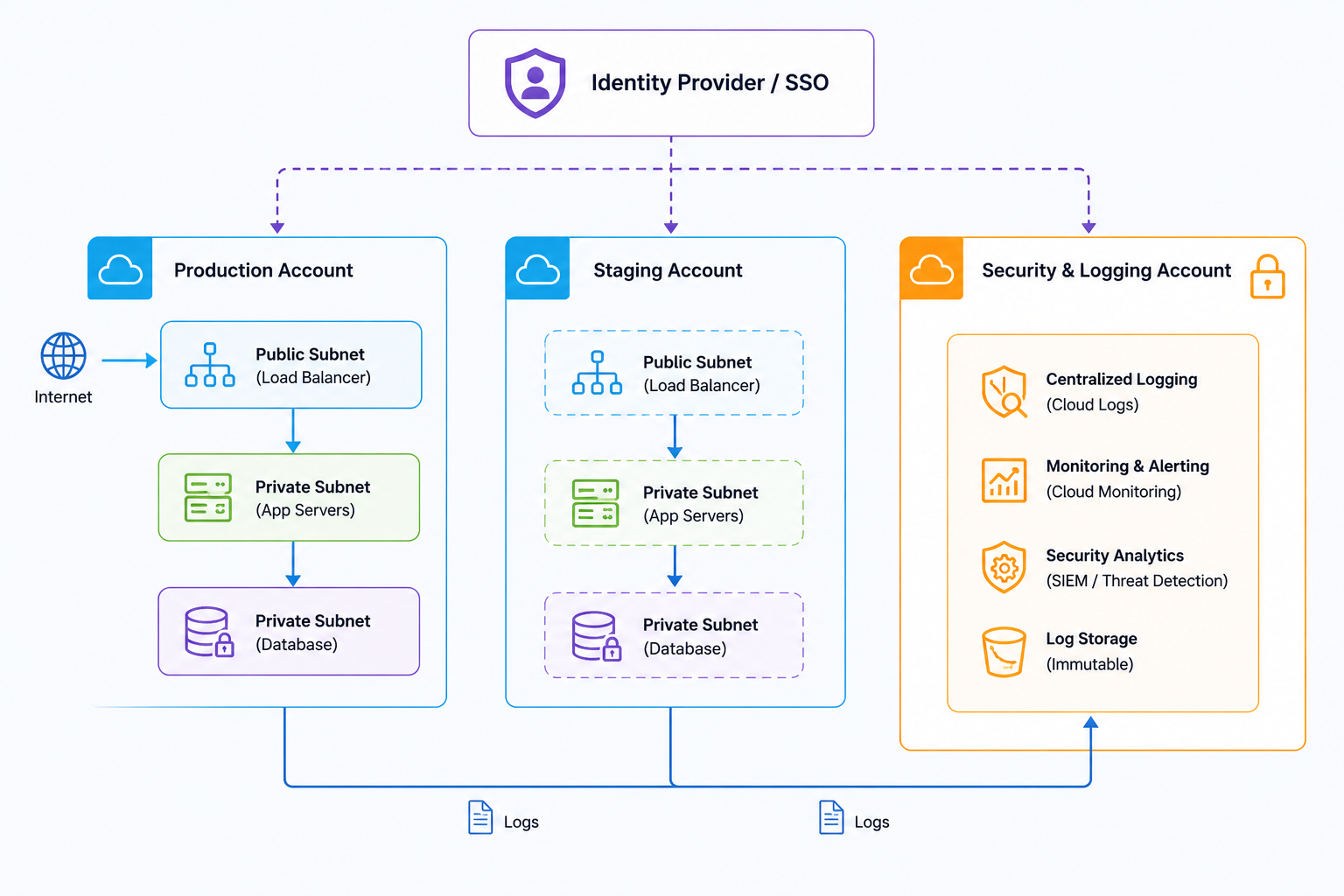
Most of the environments we review eventually converge on some version of the layout below: workloads separated from a locked-down central security/logging account, with a dedicated identity provider rather than long-lived per-user cloud credentials.
The Checklist
Work through each pillar. If you're unsure of an answer, that's usually the most useful signal of all.
Identity & Access
- ✓
No IAM policies use wildcard (
*) permissions on production resources. - ✓
Root / global admin accounts have MFA enforced and are not used for day-to-day work.
- ✓
Human users authenticate via SSO/identity provider, not long-lived static access keys.
- ✓
Unused roles, users and access keys are reviewed and removed on a regular schedule.
Network Exposure
- ✓
Databases and internal services sit in private subnets with no direct route to the internet.
- ✓
Security groups / firewall rules don't have any 0.0.0.0/0 inbound rules on management ports (SSH, RDP, database ports).
- ✓
There's a current inventory of every public IP and load balancer, with an owner for each.
Data Protection
- ✓
Storage buckets and database snapshots are private by default, including in non-production accounts.
- ✓
Backups, replicas and analytics exports of sensitive data are inventoried, not just primary databases.
- ✓
Encryption at rest is enabled using keys you control (not provider-default keys) for regulated data.
Logging & Monitoring
- ✓
Account-level audit logging (e.g. CloudTrail, Activity Log) is enabled in every account, including new ones by default.
- ✓
Logs are shipped to a separate account or service that workload accounts can't modify or delete.
- ✓
Alerts exist for high-risk changes, such as new admin users, disabled logging, or public bucket policy changes.
Configuration Drift
- ✓
Production infrastructure is defined in code (Terraform/CloudFormation/etc.), with manual console changes the exception, not the norm.
- ✓
There's an automated check that flags resources not matching the defined IaC state.
- ✓
"Temporary" changes (open ports, broadened permissions) have an expiry process, not just good intentions.
Frequently Asked Questions
We're multi-cloud. Does this checklist still apply?
Yes. The five pillars are provider-agnostic; only the specific service names change (e.g. IAM policies vs. Azure RBAC, S3 vs. Blob Storage, CloudTrail vs. Activity Log). We run the same structure across AWS, Azure and GCP engagements.
How is this different from a cloud security posture management (CSPM) tool scan?
CSPM tools are great for catching known misconfiguration patterns at scale, but they don't understand your architecture's intent: a human reviewer can tell the difference between "this bucket is public and shouldn't be" and "this bucket is public on purpose and serves static assets." We typically use CSPM output as a starting point, not the conclusion.
Do you need production access to run an assessment?
No, most of our cloud security reviews are read-only, using a scoped audit role with view-level permissions across the accounts in scope. We never need write or admin access to assess configuration.
How long does a cloud security assessment take?
For a single-account environment of moderate size, typically 1-2 weeks including the report. Multi-account or multi-cloud environments usually take 2-4 weeks depending on account count.
About the Author
Priya Nair
Cloud Security Architect, CipherTrivia · AWS & Azure Certified
Priya leads cloud security reviews and architecture work at CipherTrivia, helping teams move from "we think it's locked down" to environments backed by infrastructure-as-code and continuous checks. She's previously worked as a cloud infrastructure engineer, which shapes how she explains findings to engineering teams.
Need expert cloud security assessment?
Our cloud security team reviews AWS, Azure and GCP configurations and IAM policies.
Want a second pair of eyes on your cloud setup?
Tell us about your AWS, Azure or GCP environment, and see our cloud security services for what's included.
Schedule a Meet