
Whitepaper · Web Application Security
Web Application Security Checklist
A three-level maturity model (Foundational, Standard, Advanced) that tells you not just what to fix, but where your application actually sits today.
- Category:
- Web Application Security
- Read time:
- 10 minutes
- Based on:
- CipherTrivia web application penetration test reports
When a client asks "are we secure?", a yes/no answer is almost never useful. What's useful is knowing where you sit on a scale, and what the next step up actually requires. After several years of web application assessments, we group what we find into three levels. Most applications we test land somewhere in the middle of Level 2, with a handful of Level 1 gaps still open.
This checklist is organized the same way: read through the levels, be honest about which controls are actually in place (not just planned), and you'll have a realistic picture of where you stand, plus a prioritized list of what closes the gap to the next level.
The Three Levels
Level 1: Foundational
BaselineThe minimum that should be true of any application handling user data. Applications missing items here are usually one or two steps away from a critical finding.
- ✓
All input is validated server-side, regardless of client-side checks.
- ✓
Database queries use parameterized statements, with no string-concatenated SQL anywhere.
- ✓
Sessions use secure, HttpOnly, SameSite cookies and expire after inactivity.
- ✓
Every page that returns user data checks that the logged-in user is authorized to see that specific record.
- ✓
No secrets, API keys or database credentials in client-side JavaScript or version control history.
Level 2: Standard
Where most apps sitThis is where defenses become deliberate rather than incidental: security headers, rate limiting, and a process for keeping dependencies current.
- ✓
Content-Security-Policy, X-Frame-Options and other security headers are set and actually restrictive (not just present).
- ✓
Login, password reset and other sensitive actions are rate-limited and logged.
- ✓
Multi-factor authentication is available, and required for admin and privileged accounts.
- ✓
Dependencies are scanned for known vulnerabilities as part of the build, not just at release time.
- ✓
File uploads are validated by content, restricted by type and size, and stored outside the web root.
- ✓
Error pages and API responses don't leak stack traces, internal paths or framework versions.
Level 3: Advanced
MatureControls here assume that something will eventually go wrong, and focus on detecting it quickly and limiting the blast radius.
- ✓
Authorization logic is centralized (not re-implemented per endpoint) and covered by automated tests.
- ✓
Security-relevant events (auth failures, permission changes, data exports) are logged centrally and alertable.
- ✓
A web application firewall or equivalent runtime protection is tuned to your application, not running on default rules.
- ✓
Regular, scoped penetration testing is part of the release cycle, not a one-time event.
What "Standard" Looks Like in Practice
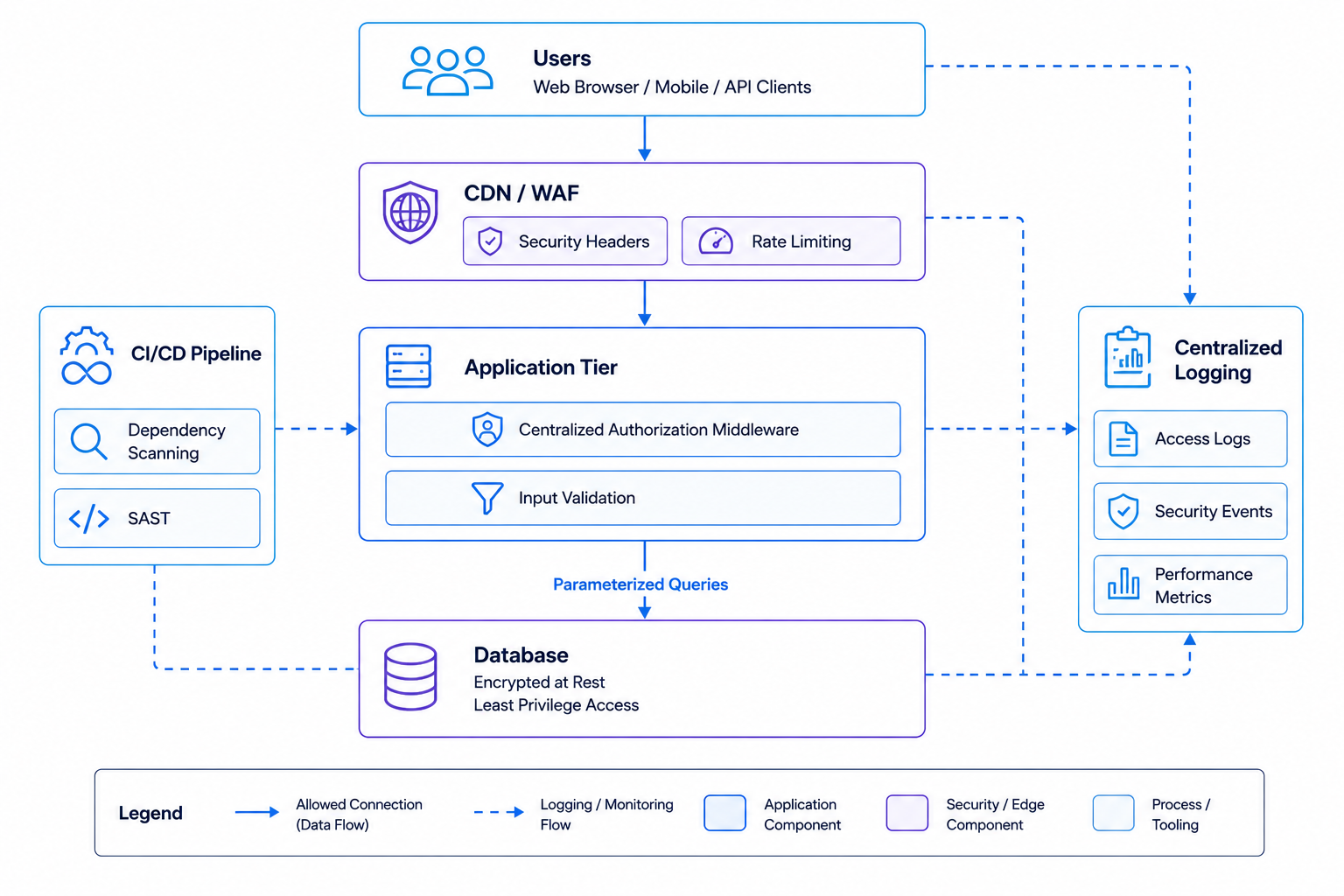
The diagram below maps Level 2 controls onto a typical web application stack: security headers and rate limiting at the edge, centralized authorization in the application tier, and dependency scanning in the build pipeline.
Why Applications Plateau at Level 2
In our experience, the jump from Level 1 to Level 2 usually happens naturally as a development team matures, since security headers and dependency scanning are well-documented, low-friction additions. The jump from Level 2 to Level 3 is different: it requires centralizing authorization logic that's often grown organically across dozens of endpoints, and committing to a recurring testing cadence rather than a one-off audit.
Neither is a criticism. Most applications don't need Level 3 across the board. The point of this model is to help you decide, deliberately, which parts of your application (the ones handling payments, personal data, or admin functions) are worth the investment to push to Level 3, rather than treating "more security" as an undifferentiated goal.
Frequently Asked Questions
How do we find out which level we're at?
A web application penetration test against this checklist gives you a direct, evidence-based answer, including which specific endpoints or flows fall short of each level, not just an overall score.
Does this apply to single-page applications and APIs too?
The principles apply broadly, but APIs have their own specific risk patterns (object-level authorization, rate limiting per client, etc.). See our API Security Best Practices guide for the API-specific version of this model.
We use a popular framework: doesn't it handle most of this for us?
Modern frameworks help significantly with Level 1 items (parameterized queries, CSRF protection, escaping). But Level 2 and 3 controls, such as rate limiting on specific business logic, centralized authorization across custom endpoints, and logging strategy, are almost always application-specific decisions a framework can't make for you.
How long does an assessment against this model take?
For a typical business web application, a thorough assessment runs one to two weeks depending on the number of roles, user flows and integrations. We scope this precisely after a short walkthrough of your application.
About the Author
Sneha Reddy
Senior Web Application Security Engineer, CipherTrivia · OSCP & CEH
Sneha leads web application assessments at CipherTrivia and built this maturity model after noticing how many clients asked "are we secure" without a way to track progress over time. She works mainly with SaaS and fintech product teams running on tight release cycles.
Need expert web app security testing?
Our web application security testing team can assess your apps against OWASP Top 10.
Find out which level your application is at
A focused web application penetration test maps your app against this checklist. See our web application security services.
Schedule a Meet