
Whitepaper · Application Security
OWASP Top 10 Security Guide
How CipherTrivia's penetration testers actually test for, find and fix each of the OWASP Top 10 (2021) risk categories, with a secure reference architecture and engagement data from our own assessments.
- Category:
- Application Security
- Read time:
- 12 minutes
- Based on:
- OWASP Top 10 (2021) + CipherTrivia engagement data
Overview
Every web and API penetration test our team runs at CipherTrivia is scoped against the OWASP Top 10. This isn't a compliance checkbox; it reflects the categories of bugs that actually get exploited in production. This guide is our internal reference, rewritten for engineering teams: what each risk really looks like in code and infrastructure, what we specifically probe for during an assessment, and how teams typically fix it for good rather than patching the symptom.
It ends with the secure reference architecture we hand to clients during scoping calls, a self-check list your team can run this week, and answers to the questions we're asked most often during kickoff meetings.
What We See in Our Assessments
Across recent web and API engagements run by our team, a handful of OWASP categories account for most of the high and critical findings we report:
~38%
of critical findings are Broken Access Control (A01)
~22%
trace back to Security Misconfiguration (A05)
~17%
involve outdated or vulnerable components (A06)
1 in 3
apps we test lack centralized security logging (A09)
Figures are directional, based on patterns observed across CipherTrivia's recent VAPT engagements, and are intended to help teams prioritize. Your own results will vary by stack and maturity.
What's Inside
1. The OWASP Top 10 (2021): What We Test & How We Fix It
A01: Broken Access Control
Users acting outside their intended permissions: viewing, modifying or deleting another user's data by changing an ID, role, or tenant reference in a request.
What we test: we systematically swap object IDs, tenant IDs and role parameters across every authenticated endpoint, including ones the UI doesn't expose, using both horizontal (same role, different account) and vertical (lower role to higher role) test cases.
How teams fix it: move authorization checks into shared middleware that runs on every request based on the authenticated session, and never trust an ID supplied by the client without re-checking ownership server-side.
A02: Cryptographic Failures
Sensitive data exposed because it's unencrypted, weakly encrypted, or protected with hardcoded or reused keys.
What we test: we inspect TLS configuration and cipher suites, check whether PII and credentials are encrypted at rest, and search for hardcoded keys or secrets in client-side code, mobile binaries and config files.
How teams fix it: enforce TLS 1.2+ everywhere, encrypt sensitive fields at rest with managed key services (e.g. AWS KMS, Azure Key Vault), and rotate any secret found in source control immediately.
A03: Injection
Untrusted input passed to an interpreter as part of a command or query: SQL, NoSQL, OS command, LDAP and template injection all fall here.
What we test: every input field, query parameter, header and file upload is fuzzed with payloads targeting SQL, NoSQL, command and template injection, with both error-based and time-based blind techniques.
How teams fix it: use parameterized queries or an ORM for all database access, validate and allow-list input where possible, and avoid building shell commands or templates from user input entirely.
A04: Insecure Design
Security gaps baked into the design itself: missing rate limits on sensitive flows, business logic that assumes good faith, or workflows with no abuse-case modeling.
What we test: we map critical business flows (signup, checkout, password reset, fund transfer) and test abuse cases, asking whether a flow can be replayed, skipped, raced, or automated at scale.
How teams fix it: include threat modeling in design reviews for any flow that moves money, changes account state, or sends communications, and add rate limits and idempotency checks by default.
A05: Security Misconfiguration
Insecure defaults, open cloud storage, unnecessary features enabled, verbose error pages, or missing security headers.
What we test: we review HTTP security headers, check cloud storage and database ACLs for public exposure, and look for default credentials, exposed admin panels and debug endpoints left enabled in production.
How teams fix it: bake a hardened configuration baseline into your infrastructure-as-code, and run automated configuration drift checks against cloud accounts on a schedule, not just before launch.
A06: Vulnerable and Outdated Components
Using libraries, frameworks or runtime versions with known, exploitable vulnerabilities, often inherited transitively through dependencies.
What we test: we fingerprint frameworks, libraries and server software in use, cross-reference against known CVEs, and attempt exploitation of any version-specific vulnerabilities found exposed.
How teams fix it: add automated dependency scanning (e.g. Dependabot, Snyk) to your CI pipeline, and set an internal SLA for patching critical CVEs (typically 7 days for internet-facing systems).
A07: Identification and Authentication Failures
Weak password policies, broken session management, missing account lockouts, or no multi-factor authentication on sensitive accounts.
What we test: we test password reset and account recovery flows for logic flaws, attempt credential stuffing and brute force against login endpoints, and check session token entropy, expiry and invalidation on logout.
How teams fix it: enforce MFA for admin and privileged roles at minimum, use short-lived tokens with proper invalidation, and rate-limit authentication endpoints with progressive lockouts.
A08: Software and Data Integrity Failures
Code and infrastructure that doesn't verify integrity: unsigned software updates, insecure deserialization, or CI/CD pipelines that trust unverified third-party plugins.
What we test: we review CI/CD pipeline configuration for unrestricted plugin sources and secrets exposure, and test any deserialization endpoints for object injection.
How teams fix it: sign and verify build artifacts, pin CI/CD dependencies to known versions, and avoid deserializing untrusted data; prefer plain data formats like JSON with schema validation.
A09: Security Logging and Monitoring Failures
Insufficient logging, monitoring and alerting, meaning breaches and abuse can go undetected for weeks or months.
What we test: during the engagement, we check whether our own testing activity (failed logins, access-control probes, injection attempts) would have generated any alert at all.
How teams fix it: centralize logs from application, infrastructure and auth services into one place, and configure alerts for the specific abuse patterns relevant to your business, not just infrastructure uptime.
A10: Server-Side Request Forgery (SSRF)
An application fetches a remote resource based on a user-supplied URL without validation, letting attackers reach internal services, cloud metadata endpoints, or other restricted networks.
What we test: any feature that fetches a URL (webhooks, image imports, PDF generation, link previews) is tested against internal IP ranges and cloud metadata endpoints (e.g. 169.254.169.254).
How teams fix it: restrict outbound requests from application servers to an allow-list of known destinations, and disable cloud metadata access for workloads that don't need it.
2. Secure Reference Architecture
This is the reference architecture our consultants sketch out during scoping calls. It's the minimum shape we'd expect a production web application to follow, and most of the OWASP Top 10 risks map onto a specific layer below.
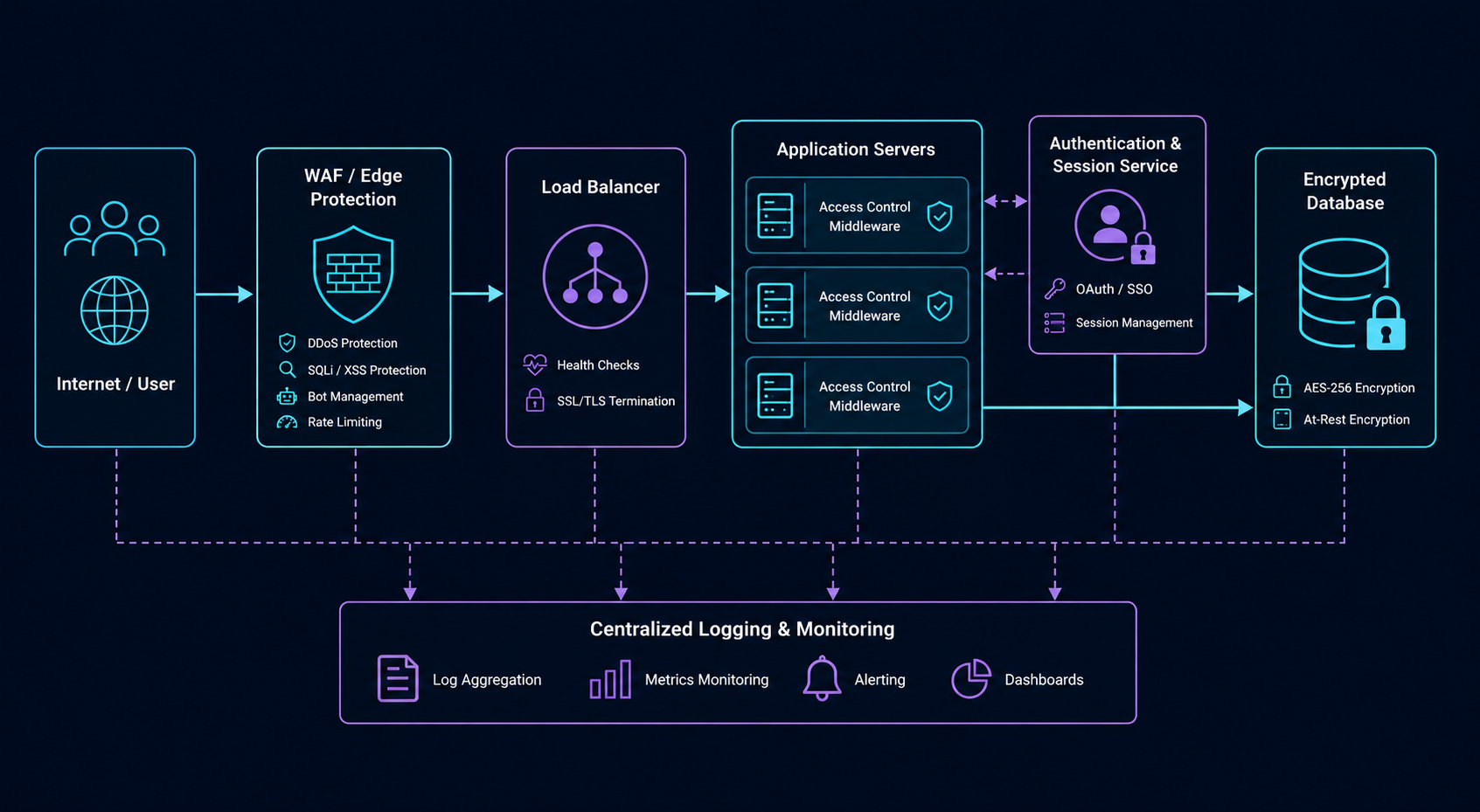
Key controls shown in the diagram, and the risks they address:
- Edge / WAF: filters common injection and SSRF patterns before they reach the application (A03, A10).
- Authentication & session service: centralizes login, MFA and session handling (A07).
- Application tier with access-control middleware: enforces per-request authorization checks (A01, A04).
- Encrypted data store: encryption at rest and in transit, with scoped database credentials (A02).
- CI/CD with dependency & artifact scanning: catches outdated components and unsigned artifacts before deploy (A06, A08).
- Centralized logging & monitoring: aggregates security events with alerting on anomalies (A09, A05).
3. Quick Self-Check Checklist
This is the same opening checklist our consultants run through on a kickoff call. Any "no" is a strong candidate for your next assessment.
- ✓
Are authorization checks enforced server-side on every request, not just hidden in the UI?
- ✓
Is sensitive data encrypted both in transit (TLS 1.2+) and at rest using managed keys?
- ✓
Are all database queries parameterized, with no string-concatenated SQL anywhere in the codebase?
- ✓
Do critical flows (signup, checkout, password reset, transfers) have rate limits and abuse-case tests?
- ✓
Do you have an inventory of third-party libraries with automated vulnerability scanning and a patch SLA?
- ✓
Is multi-factor authentication enforced for admin and privileged accounts?
- ✓
Are security-relevant events (logins, permission changes, failed authz) logged and monitored centrally?
- ✓
Do error responses avoid exposing stack traces, internal hostnames or framework versions?
- ✓
Are outbound requests from your servers restricted to a known allow-list of destinations?
4. Frequently Asked Questions
Is the OWASP Top 10 enough on its own for a penetration test?
No, it's a strong baseline, but a thorough assessment also covers business-logic abuse cases, infrastructure configuration, and anything specific to your industry (for example, payment flows or PHI handling). CipherTrivia engagements use the OWASP Top 10 as a floor, not a ceiling.
How often should we test against the OWASP Top 10?
At minimum annually, and after any release that touches authentication, payments, or access control. Teams shipping weekly often pair a full annual assessment with smaller, scoped retests on major changes.
Which OWASP Top 10 category is the most commonly missed by automated scanners?
A01 (Broken Access Control) and A04 (Insecure Design). Automated scanners can flag missing headers or outdated libraries, but identifying that user A can access user B's data by changing an ID requires a human tester who understands the application's logic.
Can CipherTrivia map findings directly to OWASP Top 10 categories in our report?
Yes: every finding in a CipherTrivia VAPT report is tagged with its OWASP category alongside CVSS scoring, which makes it straightforward to track remediation progress by category over time.
5. Who Should Read This
This guide is written for developers, engineering leads and security champions who want a practical, architecture-level understanding of the OWASP Top 10, grounded in what we actually find during real assessments rather than just definitions.
Arjun Mehta
Lead Penetration Tester, CipherTrivia · OSCP & CREST CRT
Arjun leads web and API penetration testing engagements at CipherTrivia, working across fintech, healthcare and SaaS clients. He's run hundreds of OWASP-aligned assessments and regularly works with engineering teams through to remediation and retest.
Need a security architecture review?
Our security architects can assess your application design for OWASP Top 10 control gaps.
Want a gap assessment against the OWASP Top 10?
Our team can run a focused review of your application against each of these risk categories. See our VAPT services for what's included.
Schedule a Meet