
Whitepaper · Mobile App Security
Mobile App Security Checklist
A walkthrough of the first hour of a mobile app assessment: what we open first, what usually falls out, and the checklist that prevents it.
- Category:
- Mobile App Security
- Read time:
- 10 minutes
- Covers:
- iOS & Android, based on OWASP MASVS
Before I ever tap a button in a mobile app, I've usually already found two or three issues, just by unzipping the build. Mobile apps ship as files that sit on a user's device, which means anyone can pull them apart at their own pace, offline, with no rate limiting and no monitoring. That changes the threat model in ways teams coming from web development don't always expect.
This checklist follows the order we actually work in during an assessment: static teardown first, then runtime behavior, then the backend APIs the app talks to. Each stage has its own checklist below.
Stage 1: Before We Run the App
An APK or IPA is just an archive. Decompiling it takes minutes with free tools, and what's inside is often more revealing than teams expect:
Hardcoded secrets
API keys, signing secrets, and sometimes full backend credentials are visible directly in decompiled source or string resources, often left over from development environments.
Weak or missing code obfuscation
Business logic, including how licensing, payments or feature gating works, is readable almost as-written, making it straightforward to bypass.
Insecure local storage
Session tokens, cached personal data, or PINs stored in plaintext in app-local databases or shared preferences, recoverable from any device the user owns (or has lost).
Stage 1 checklist:
- ✓
No API keys, credentials, or signing secrets in the decompiled source, resources or build config.
- ✓
Code obfuscation/minification is applied to release builds, particularly around licensing and payment logic.
- ✓
Locally stored data (tokens, cache, PINs) is encrypted using platform keystore/keychain mechanisms, not stored in plaintext.
Stage 2: While the App Is Running
Once the app is installed on a test device with traffic routed through an interception proxy, the questions shift to how the app defends itself at runtime.
- ✓
The app uses certificate pinning, or at minimum rejects connections through an untrusted proxy/CA.
- ✓
The app detects (and meaningfully responds to) rooted/jailbroken devices for sensitive functions like payments.
- ✓
Sensitive screens (balances, personal data) are excluded from the OS task-switcher screenshot/preview.
- ✓
Clipboard access to sensitive fields (OTPs, card numbers) is restricted, and biometric prompts can't be bypassed.
- ✓
Deep links and custom URL schemes validate input and can't be used to trigger unintended actions.
Stage 3: The Backend Behind the App
By this point we've usually captured the full set of API calls the app makes, including ones not visible in the UI. This is often where the most impactful findings live, because the same authorization issues common in web APIs apply here, but client-side controls (like a "premium" UI badge) are frequently mistaken for actual security.
- ✓
Every API endpoint the app calls enforces authorization server-side, not just feature-gated in the app UI.
- ✓
Endpoints used only by internal/debug builds are removed or disabled in production, not just hidden from the UI.
- ✓
Push notification payloads and deep-link parameters are treated as untrusted input.
For the full backend-side checklist, see our API Security Best Practices guide, as most mobile backends are tested against both.
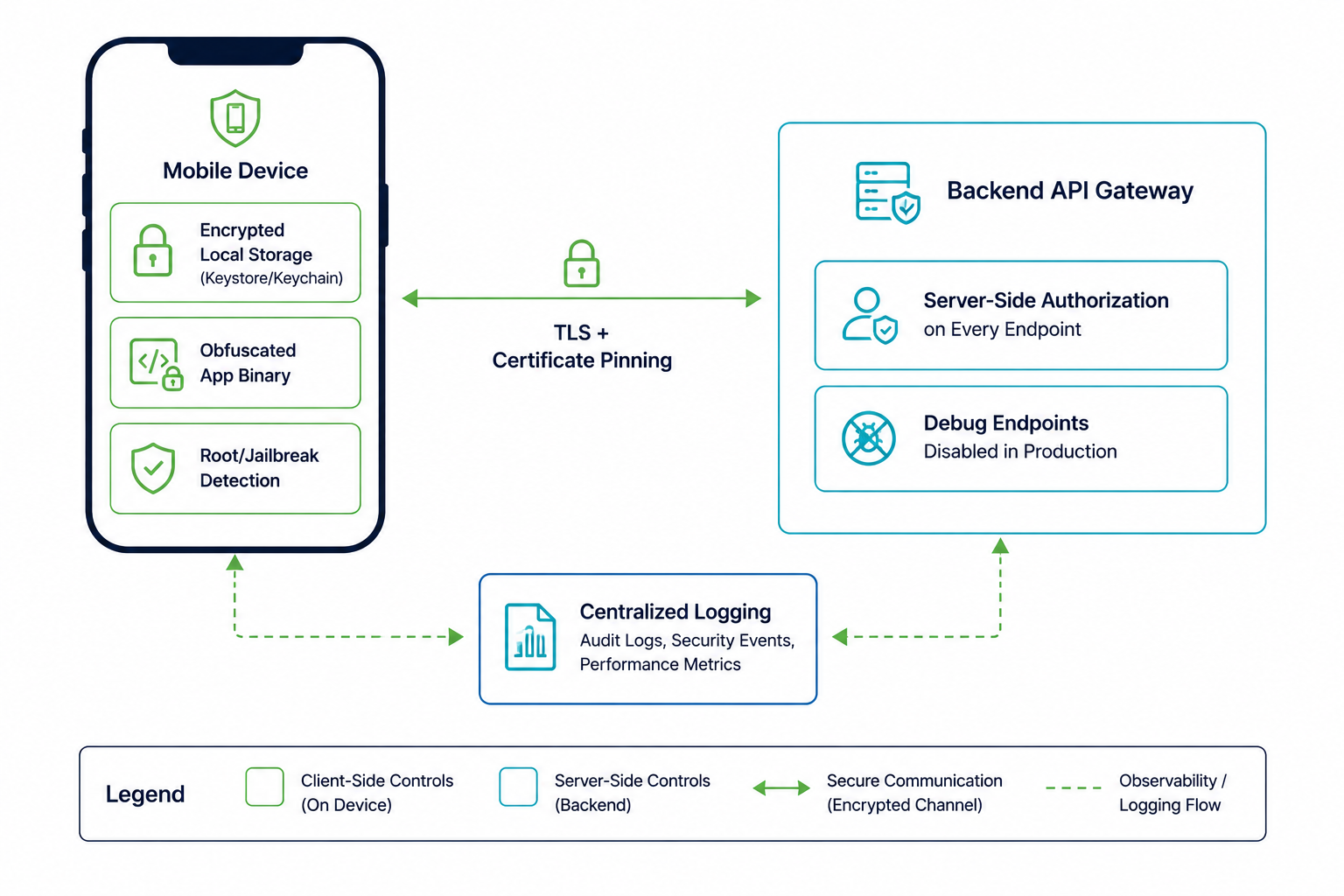
A Hardened Mobile App Architecture
The diagram below shows how the controls above fit together: defenses at the device, transport and backend layers, each addressing a different stage of the assessment above.
Frequently Asked Questions
Do you test both iOS and Android?
Yes, the platforms differ in tooling and some platform-specific controls (keychain vs. keystore, App Transport Security vs. network security config), but the assessment stages above apply to both, and we report findings per platform.
Can you test an app that's not yet on the app store?
Yes: we regularly test pre-release builds (APK/IPA files or TestFlight/internal track builds) provided directly by the development team.
Is obfuscation alone enough to protect business logic?
No, obfuscation raises the effort required but doesn't make logic unreadable to a determined attacker. Anything that must not be bypassed (entitlements, pricing, payment validation) needs to be enforced server-side, with the client treated as untrusted.
How long does a mobile app assessment take?
A single-platform assessment of a typical app is usually 1-2 weeks; testing both iOS and Android plus the backend APIs is commonly scoped as a combined 2-3 week engagement.
About the Author
Vikram Sahni
Mobile Application Security Engineer, CipherTrivia · OSCP & eMAPT
Vikram leads mobile assessments at CipherTrivia, covering fintech, healthtech and consumer apps on both iOS and Android. He maintains the team's internal reverse-engineering toolkit and regularly trains client developer teams on secure mobile coding patterns.
Need expert mobile app security testing?
Our mobile security team tests Android and iOS apps aligned to OWASP MASVS.
Know what's inside your app before someone else does
Our mobile security team can assess your iOS and Android builds. See our mobile app security services.
Schedule a Meet