
Whitepaper · Incident Response
Incident Response Checklist: The First 72 Hours
If you're reading this during an active incident: skip to "Hour 0-1" below. If you're reading this beforehand, good, that's when this checklist is most useful.
- Category:
- Incident Response
- Read time:
- 9 minutes
- Based on:
- CipherTrivia incident response engagements
If you suspect an active breach right now:
Don't power off affected systems (you may lose evidence in memory); instead, isolate them from the network. Then go to "Hour 0-1" below. If you need help immediately, contact us, as we provide emergency incident response support.
Of the incidents we've helped clients respond to, the ones that go badly almost never go badly because of the initial compromise. They go badly because of what happens in the first few hours after it's discovered. Systems get powered off (destroying evidence), the wrong people find out at the wrong time, or nobody is clearly in charge of decisions.
This checklist is organized as a timeline: what to do in the first hour, the first day, and the first three days, followed by a readiness checklist for what should already be in place before any of this happens.
The First 72 Hours
Hour 0-1
Contain & Preserve
- ✓
Isolate affected systems from the network (disconnect, don't power off) to stop spread while preserving memory and disk state.
- ✓
Notify your incident response lead (internal or external) and start a timeline log, recording every action with timestamps from this point on.
- ✓
Preserve relevant logs (auth logs, firewall logs, cloud audit trails) before retention windows roll over.
Hours 1-24
Investigate & Scope
- ✓
Establish initial scope: which systems, accounts and data were potentially accessed, and which definitely were not.
- ✓
Rotate credentials for any accounts confirmed or suspected to be compromised, but coordinate timing so it doesn't tip off an active attacker before containment is complete.
- ✓
Identify the likely initial access vector, since this shapes both containment and what you'll need to say externally.
- ✓
Loop in legal counsel early; they'll guide notification obligations and privilege considerations for the investigation.
Days 1-3
Eradicate, Recover & Communicate
- ✓
Remove attacker access (persistence mechanisms, backdoors, new accounts), confirming it's verified rather than assumed.
- ✓
Restore systems from known-clean backups or rebuilds, not by "cleaning" a potentially still-compromised system.
- ✓
Determine regulatory/customer notification requirements based on data involved and jurisdiction, and prepare communications with legal.
- ✓
Begin drafting the post-incident report while details are still fresh, since this becomes the basis for fixing root causes.
A Note From the Field
"The single most common mistake we see isn't technical: it's that the team finding the issue doesn't know who's authorized to make the call to take a production system offline. That decision gets escalated, re-escalated, and by the time it's made, hours have passed. Decide who has that authority before you need it, and write it down."
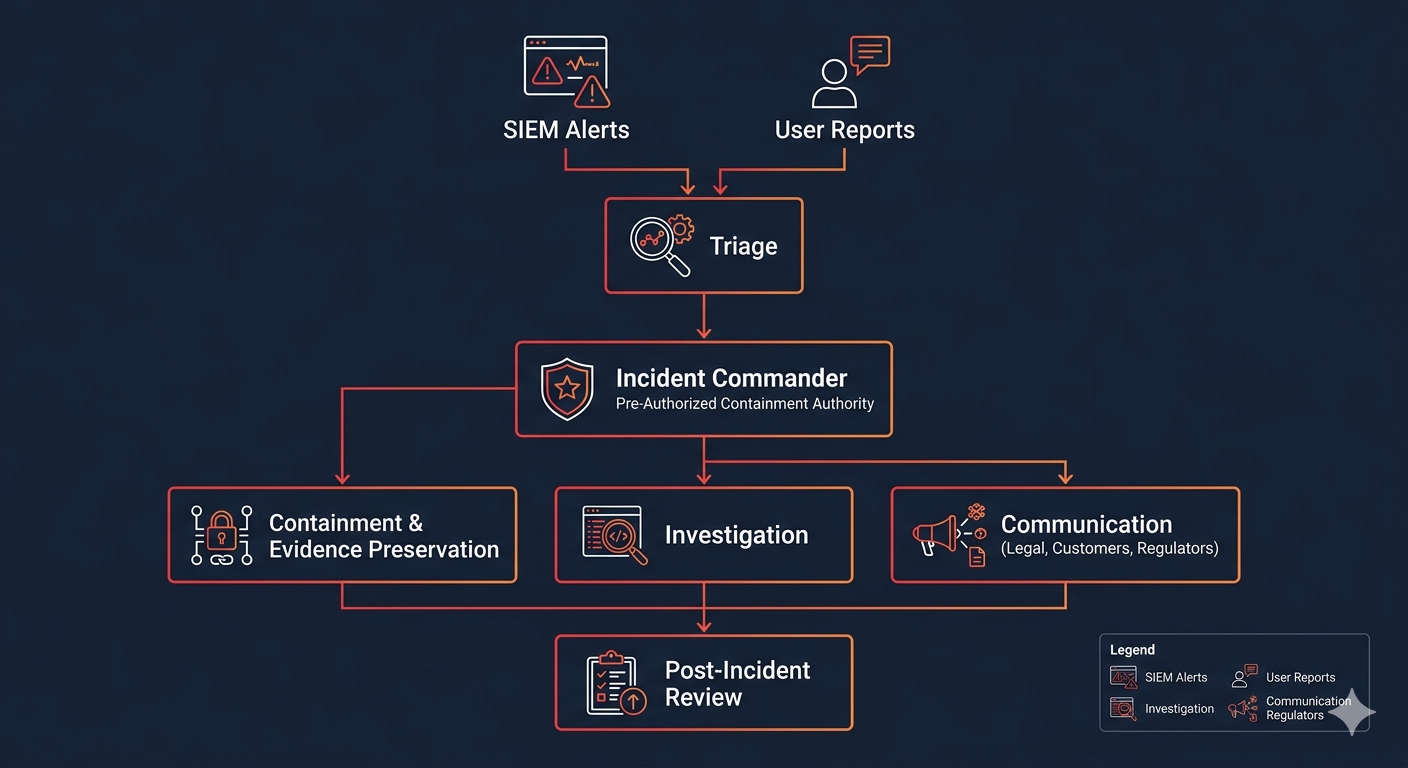
An Incident Response Readiness Flow
The diagram below shows how detection, containment and response roles connect, reflecting the structure this checklist assumes is already in place before an incident starts.
Before an Incident: Readiness Checklist
Everything above assumes a few things are already true. If any of these aren't, that's where to start:
- ✓
A named incident commander (and backup) with pre-authorized authority to isolate production systems.
- ✓
Logs (authentication, network, cloud audit) retained for at least 90 days and centrally accessible.
- ✓
An out-of-band communication channel (not your primary email/chat, in case it's compromised) for incident coordination.
- ✓
Legal counsel and an external IR provider identified and contactable in advance, not selected during the incident.
- ✓
Backups tested for restoration (not just existence) and isolated from the systems they back up.
- ✓
This checklist (or your own version of it) has been walked through in a tabletop exercise at least once.
Frequently Asked Questions
Do we need a retainer in place before an incident, or can we call you during one?
We support both, but a retainer means pre-agreed scope, rates and points of contact, which removes delay during an actual incident. We're also available for emergency engagements without a prior retainer.
What's a tabletop exercise, and do you run them?
A tabletop exercise is a facilitated walkthrough of a simulated incident with your team, to test decision-making and communication without an actual breach. Yes, we run these, typically half a day, tailored to a scenario relevant to your environment.
How do you determine what data was accessed?
Primarily through log analysis (access logs, query logs, file access timestamps) and forensic analysis of affected systems. The depth depends on what logging was in place before the incident, which is why the readiness checklist above matters.
Should we involve law enforcement?
This depends on the nature of the incident and your jurisdiction's requirements; your legal counsel should guide this decision, ideally as part of your pre-incident planning rather than during the incident itself.
About the Author
Meera Joshi
Incident Response Lead, CipherTrivia · GCIH & GCFA
Meera leads incident response engagements at CipherTrivia and runs tabletop exercises for client teams. She wrote this checklist after noticing that the same handful of early decisions, made or delayed, consistently determined how the rest of an incident went.
Need cybersecurity consulting?
Our consulting team builds incident response plans and security roadmaps for your organization.
Don't wait for an incident to find the gaps
A tabletop exercise or readiness review tests this checklist against your actual organization. See our incident response services.
Schedule a Meet